Course Insights
Turn Moodle data into actionable insight. Site-wide KPIs, course analytics, student progress tracking, and a configurable student risk-scoring engine — all in one plugin.

Screenshots
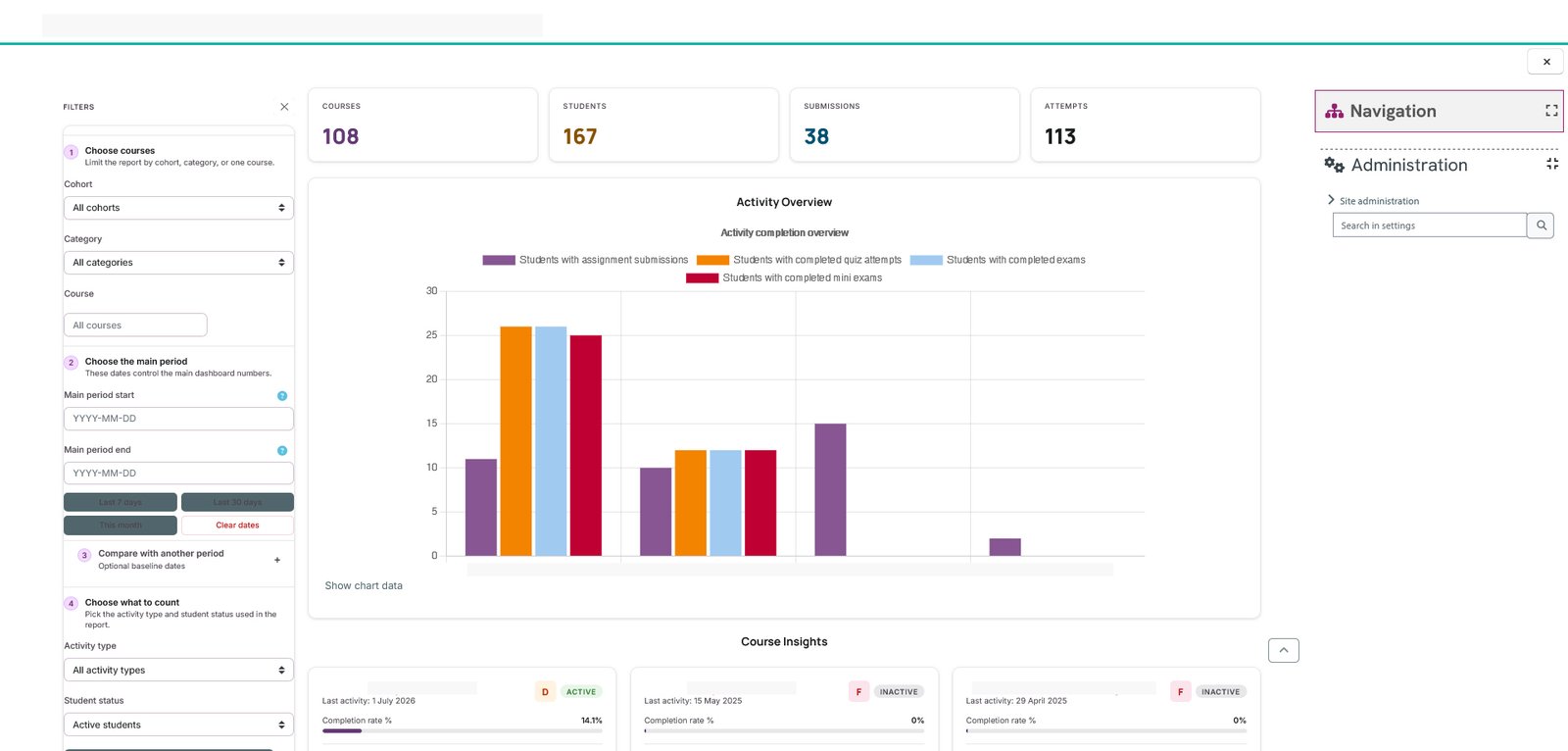
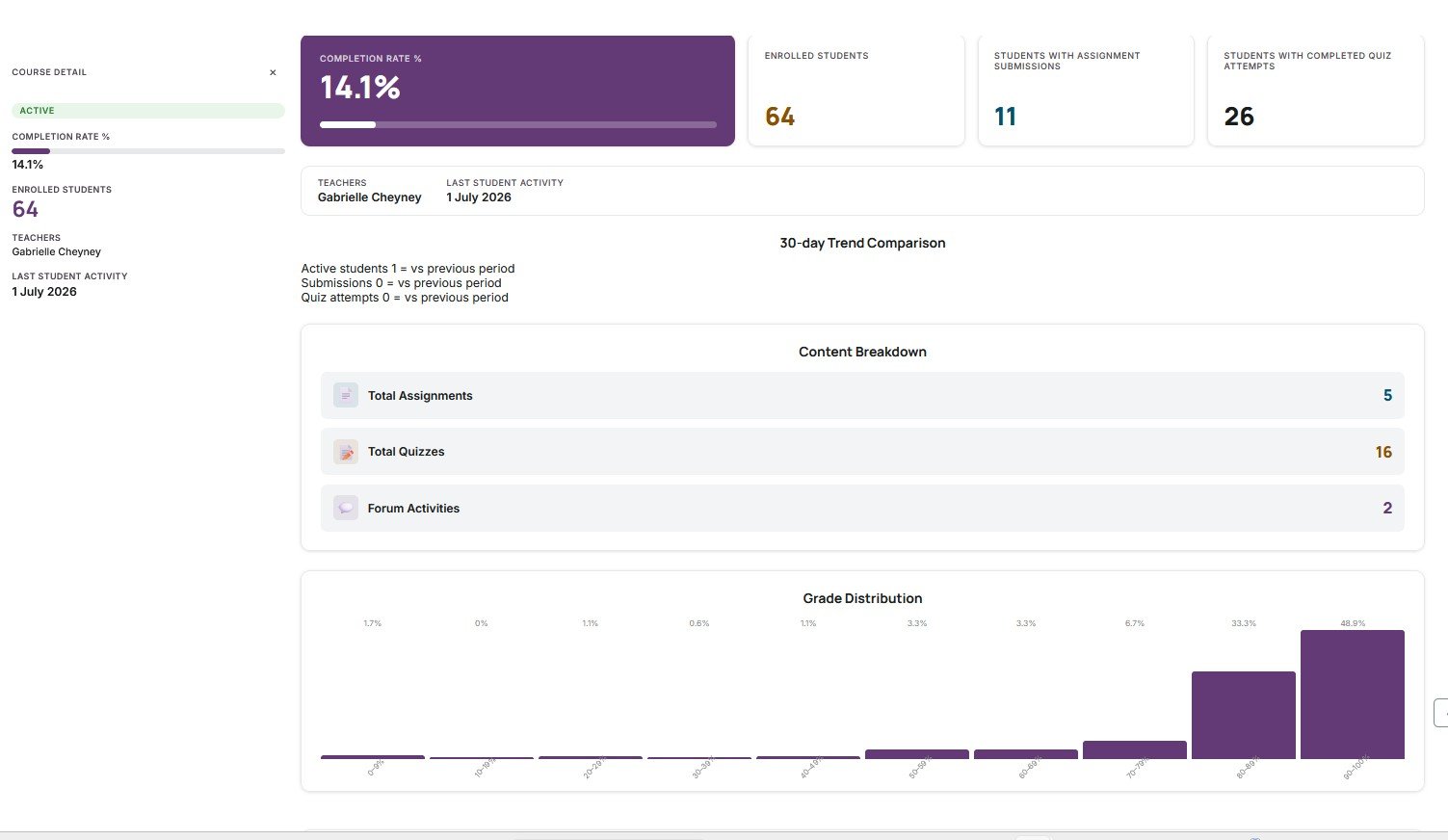
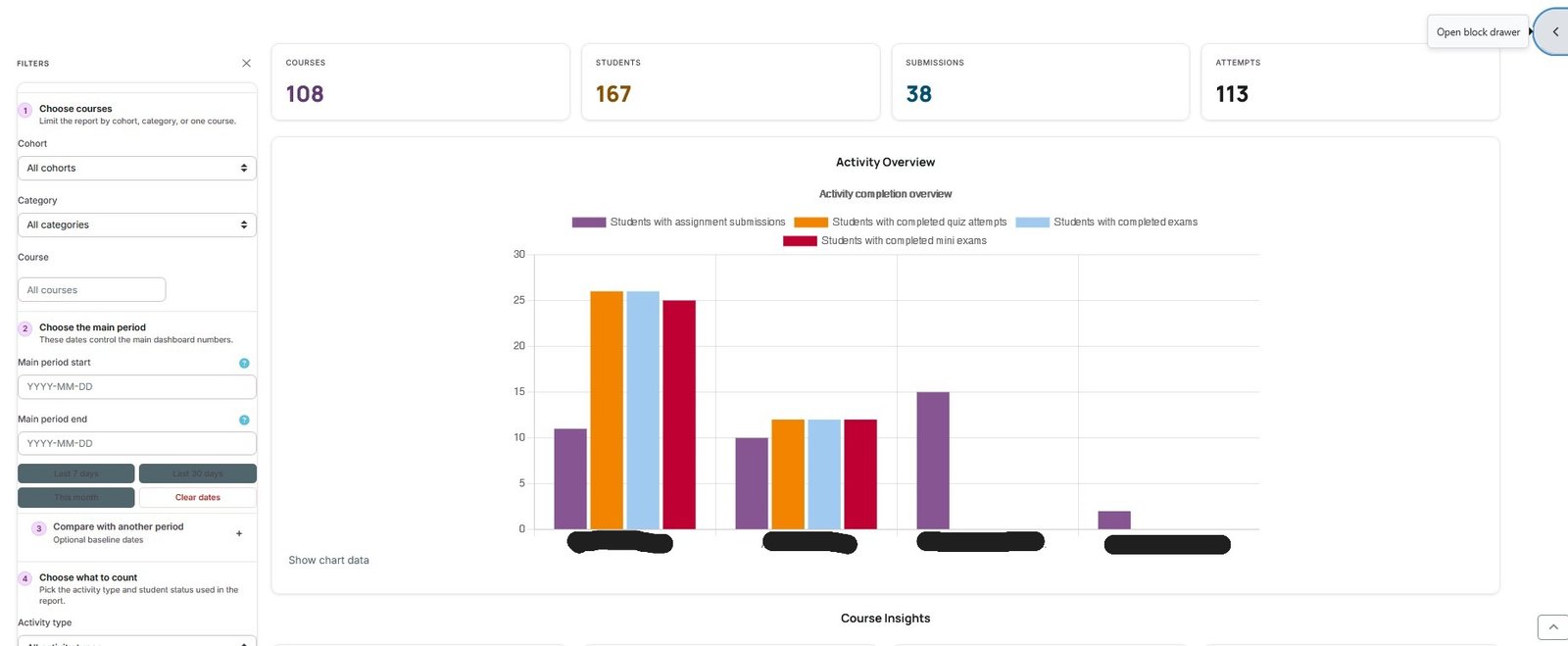
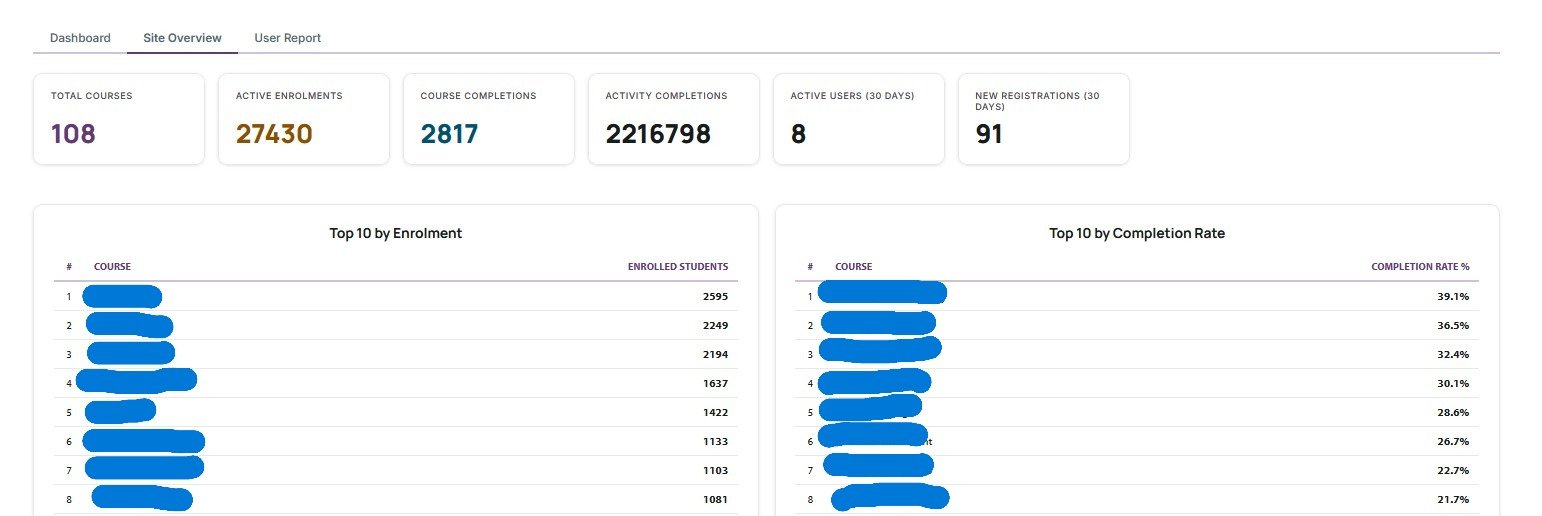
Know exactly what is happening across every course on your Moodle site
Course Insights is a commercial analytics plugin for Moodle 4.5+ that gives administrators and managers a complete picture of course health, student engagement, and at-risk learners — without needing external tools or database access.
Every metric is calculated and cached in the background so the dashboard loads fast even on large sites with thousands of enrolments.
Dashboard overview
The main dashboard lists every active course with a grade (A–F) based on submission rates, quiz attempts, average scores, and student login frequency. Colour-coded deltas show whether each course is trending up or down compared to a previous period you choose.
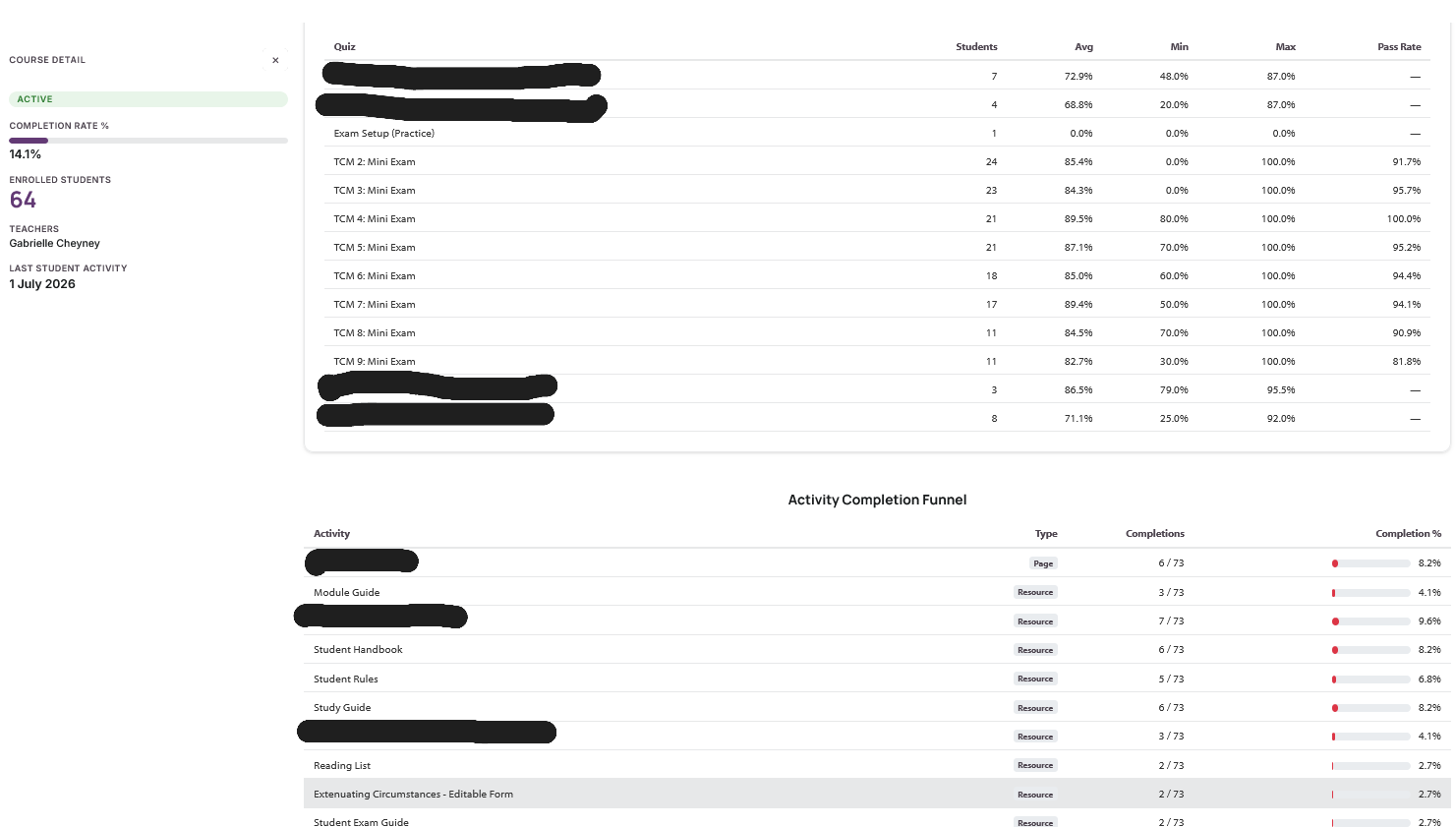
Drill into any course to see a full breakdown: a 52-week GitHub-style engagement heatmap, individual student rows with last access and completion data, assignment and quiz statistics, and a comparison of the current period against any past period you select.
At-risk detection and automated alerts
Configure an inactivity threshold (e.g. 7 days without login) and a minimum completion percentage. The plugin flags students who fall below either threshold and emails the relevant teacher and/or manager automatically. Alerts are sent by a scheduled Moodle task — no cron scripts or external services required.
A persistent at-risk snapshot table lets you compare the flagged student list week over week, so you can see whether your interventions are working.
Site Overview
A single-screen summary for administrators who manage multiple courses: total active enrolments, courses by health grade, site-wide submission rates, and a count of currently at-risk students. Loads from a pre-built snapshot for near-instant performance.
Reporting and export
One-click CSV and Excel export for any filtered view. A printer-friendly report layout. Weekly or daily digest emails to nominated managers summarising site-wide activity — useful for leadership teams who do not log in to Moodle daily.
PostgreSQL and MariaDB compatible
From version 0.47.0, all date-range aggregation uses pre-built snapshot tables and PHP-side grouping, removing every MySQL-specific date function. The plugin is tested on both MariaDB/MySQL and PostgreSQL.
What's Included
Dashboard with health scores (A–F) per course
Every course gets a grade from A to F based on submissions, quiz attempts, login frequency and completion rate. Spot struggling courses at a glance without opening each one.
Assignment submissions & quiz attempt tracking
See the exact submission count vs enrolled count for every assignment, quiz, and exam category across your site — including mini-exams and custom activity types.
52-week engagement heatmaps & student activity table
GitHub-style heatmap shows a full year of course activity at a glance. Drill down to individual student rows showing last access, days inactive, completion percentage, and grade.
Compare Period — side-by-side delta reporting
Compare any two date ranges side by side. Every metric shows a colour-coded delta so you can instantly see whether engagement and submissions are trending up or down.
Automated inactivity & low-completion alerts
Configure thresholds for days inactive and completion percentage. The plugin emails teachers and managers when students fall behind — automatically, on a schedule you control.
Digest emails, CSV / Excel export & print view
Weekly or daily digest emails to managers summarising site-wide activity. One-click CSV and Excel export for any filtered view. Printer-friendly report layout built in.
Site Overview dashboard
A single-screen summary for administrators: total active enrolments, courses by health grade, site-wide submission rates, and at-risk student count. Loads from a pre-built snapshot for near-instant performance.
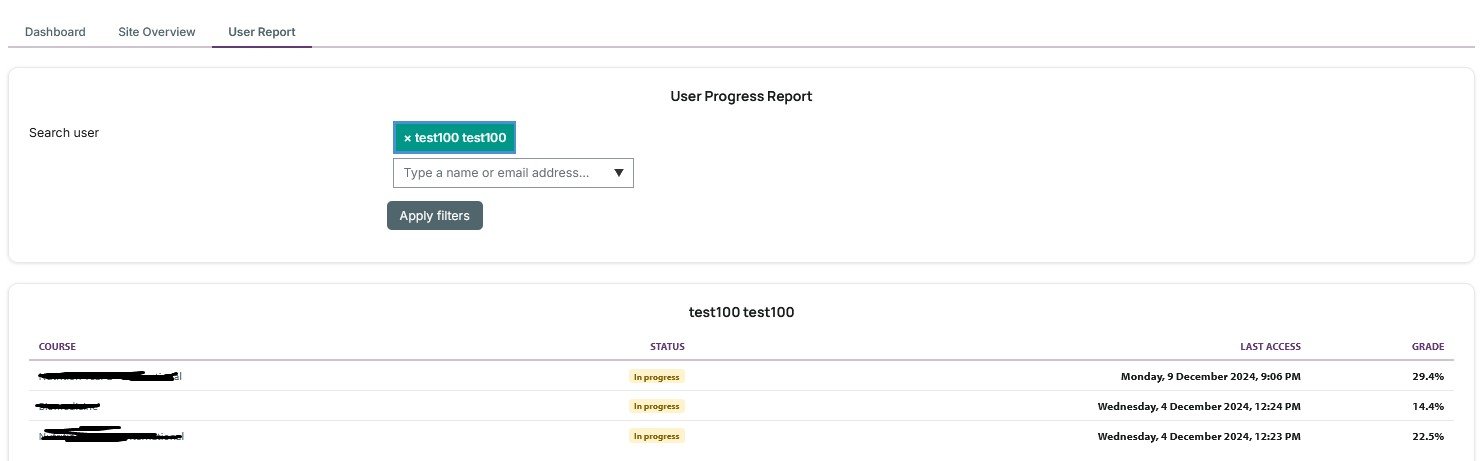
User Progress Report
Detailed per-student breakdown showing every course a learner is enrolled in — grade, last access, completion percentage, assignment and quiz attempts — all from one page.
Activity Funnel
Visualise the drop-off from enrolment → first login → first submission → completion for any course or date range. Spot exactly where learners disengage.
Student Leaderboard
Ranks enrolled students by activity score within a course. Useful for gamification, recognition programmes, or quickly identifying the least-engaged learners who need follow-up.
At-risk snapshot table
A persistent, timestamped snapshot of every student currently flagged as at risk. Compare the list week over week to measure whether interventions are reducing at-risk numbers.
Role-based access & AJAX filters
Access is controlled by a standard Moodle capability so any custom role can be granted permission. All filters (course, date range, activity type, student status) update the dashboard instantly via AJAX.
Configurable Student Risk Scoring
Automatically computes a 0-100 risk score for every at-risk student using up to five weighted signal rules. Scores are cached for 24 hours and recomputed on demand.
Five Built-in Risk Rules
Out-of-the-box rules cover: days since last login, missed assignment submissions, grade average below threshold, course completion below threshold, and no course activity. Each rule has a configurable threshold and point weight.
Risk Rules Admin Page
Site administrators can adjust every rule threshold, point weight, and enabled/disabled state from a dedicated admin page — no code changes required.
Risk Badges on At-Risk Dashboard
At-risk students on the Site Overview now display a colour-coded risk badge (Low / Medium / High / Critical) with a tooltip listing the exact triggered reasons.
Student Intervention Cases
Staff can open an intervention case directly from the at-risk dashboard with one click. Each case tracks student, course, risk score, status, assigned staff member, and optional follow-up date.
Six-stage Intervention Workflow
Cases move through a clear six-stage workflow: New, In Progress, Contacted, Monitoring, Resolved, Closed — giving managers a real-time view of every at-risk student being supported.
Case Notes Timeline
Staff add timestamped notes to each intervention. Private notes are visible to managers only. All notes appear in a chronological timeline on the case detail page.
Automated Follow-up Reminders
A scheduled task checks every morning for intervention cases where the follow-up date has passed and the case is still open. The assigned staff member (or case creator) receives a Moodle notification with a direct link to the case — so nothing slips through the cracks.
Intervention Reports
A dedicated reports page gives managers a clear view of case outcomes across any time window — last 30, 90, or 365 days, or all time. See total cases, open vs resolved counts, resolution rate, and average days to resolve. A staff caseload breakdown shows every adviser's active and resolved cases at a glance.
Configurable Monthly Trend Window
Administrators can choose how many months of logstore data (3, 6, 9, or 12) the Site Overview trend chart covers. Smaller windows mean faster nightly cache rebuilds on large sites.
System Requirements
Recent Updates
- Message Templates management page: administrators can edit the Initial Contact and Follow-up template subject and body from a dedicated tab bar page — changes apply immediately site-wide without visiting plugin settings. Setup Guide page: a built-in 5-step onboarding guide for administrators covering the cache task, admin settings, risk rules, message templates, and starting interventions — accessible from the tab bar on every plugin page.
- Staff-to-student messages now use system notifications for reliable delivery regardless of site messaging policies or user block lists.
- Intervention messages now delivered correctly to students — the intervention_contact message provider had a staff-only capability restriction that silently blocked student receipt. Error notice now shown when message delivery fails.
Frequently Asked Questions
Support
Course Insights is a commercial plugin (£149.99/year) per domain.
Purchase a licence through Moodle Marketplace. Licences include all minor releases during the year and are bound to your Moodle domain on first activation.
Questions or technical support? Email plugins@tandreig.com or use the support form on this site.
Ready to Deploy Course Insights?
Install it on your Moodle site in minutes. Need customisation or a bespoke plugin? Get in touch.
The word Moodle and associated Moodle logos are trademarks or registered trademarks of Moodle Pty Ltd or its related affiliates.